 BambooForge Labs

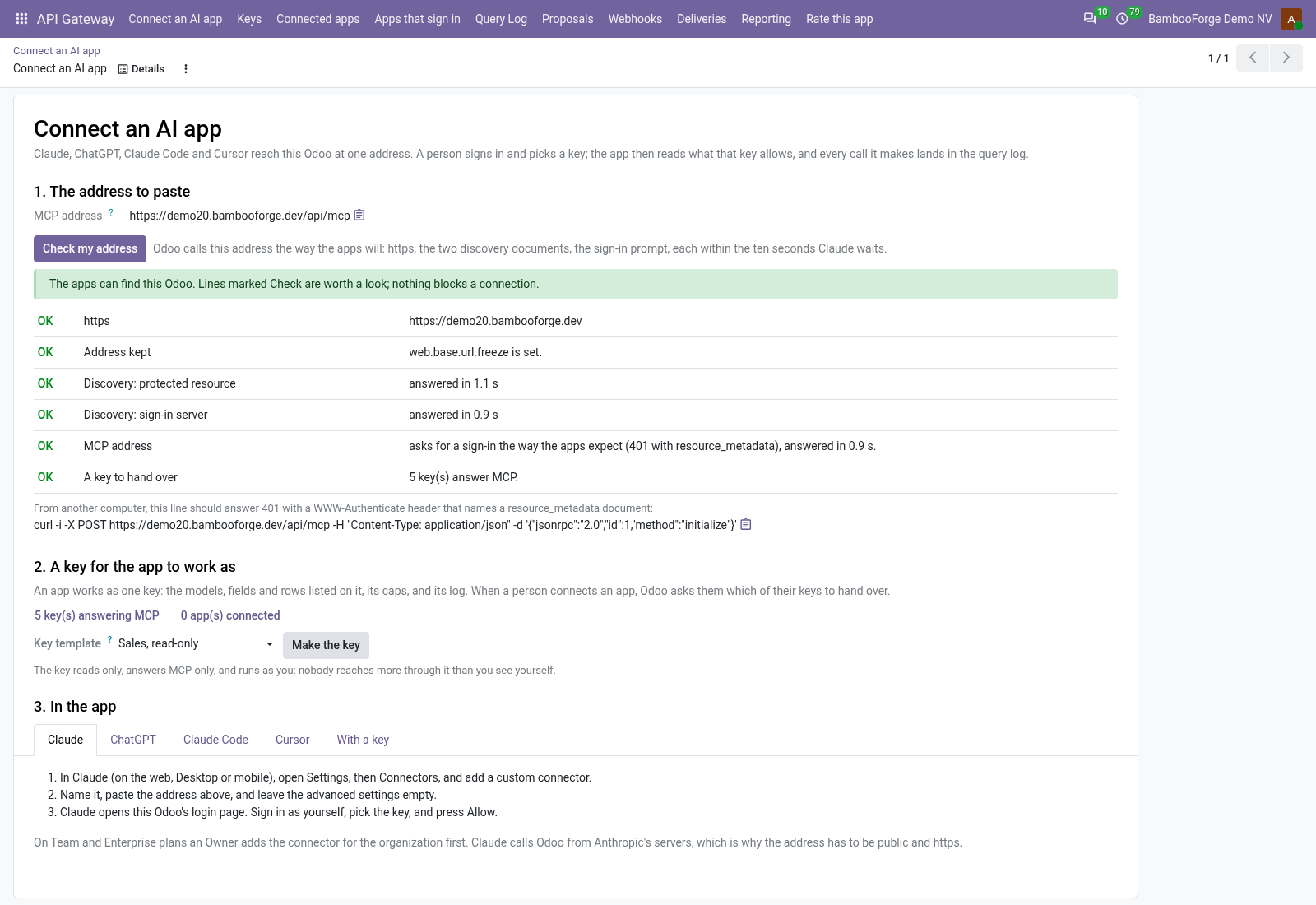
- One address to pasteConnect an AI app gives the MCP address, checks it the way the apps reach it, makes a key from a template, and says what to type in each app. A person signs in and picks the key the app works as.
- A keyhole, not a keyA key reads only the models, fields and rows you list, with caps per call, per minute and per day. An agent proposes a change; a person applies it under their own access rights.
- Every call on recordEach MCP tool call and REST call is a line in the query log: which key, what was asked, how much went out. A KPI board and an access report per key for the people who sign off.
bambooforge_ai_bridge249 automated checks run before every release of this app, the same suite on every series it ships for. The complete list is in the source you receive; run it yourself with --test-enable.
For the people who decide
What your managers see
API Gateway > Reporting is for whoever answers for the agents and systems that reach Odoo - the IT manager, the data protection officer. Each analysis opens on a chart, with the pivot one click away, and the pivot downloads to Excel from its toolbar.
KPIs
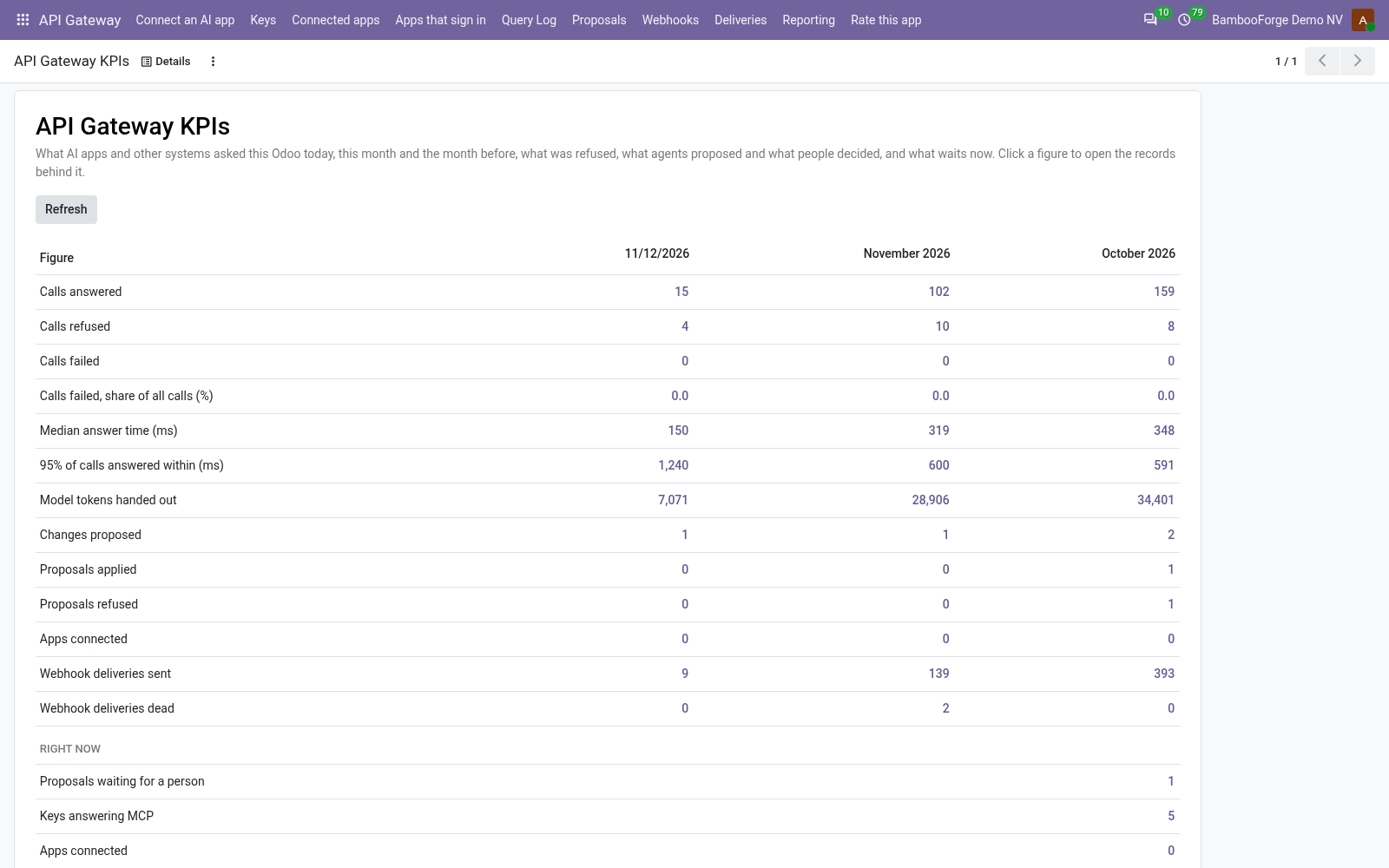
one page: calls answered, refused and failed, the share of calls that failed, the median answer time and the time within which 95 calls in 100 were answered, the model tokens handed out, changes proposed, applied and refused, apps connected, webhook deliveries sent and dead, for today, this month and the month before; right now, the proposals waiting, the keys answering MCP, the apps connected, the keys that expire within 30 days, the paused webhooks and the deliveries waiting for a retry; and this month's calls by model and call, the busiest first, with how many were refused or failed and how fast the answered ones came back. Every figure opens the records behind it, the answer times the slowest calls first.
The IT manager sees a burst of refusals, a call getting slower or a key about to expire before someone calls about it.
Messages when something breaks
when one key's calls are refused or fail 20 times within an hour, the API Gateway managers get a message on the key: how many, refused and failed, and the most frequent reason; the next one for that key waits six hours. A webhook that stops after ten dead deliveries in a row tells them too. The count is under Settings > API Gateway > Tell the managers when a key fails (0 sends nothing). Each manager gets the message in Odoo's inbox or by mail, as their preferences say.
The integration that broke at night is known in the morning, by the people who can fix it.
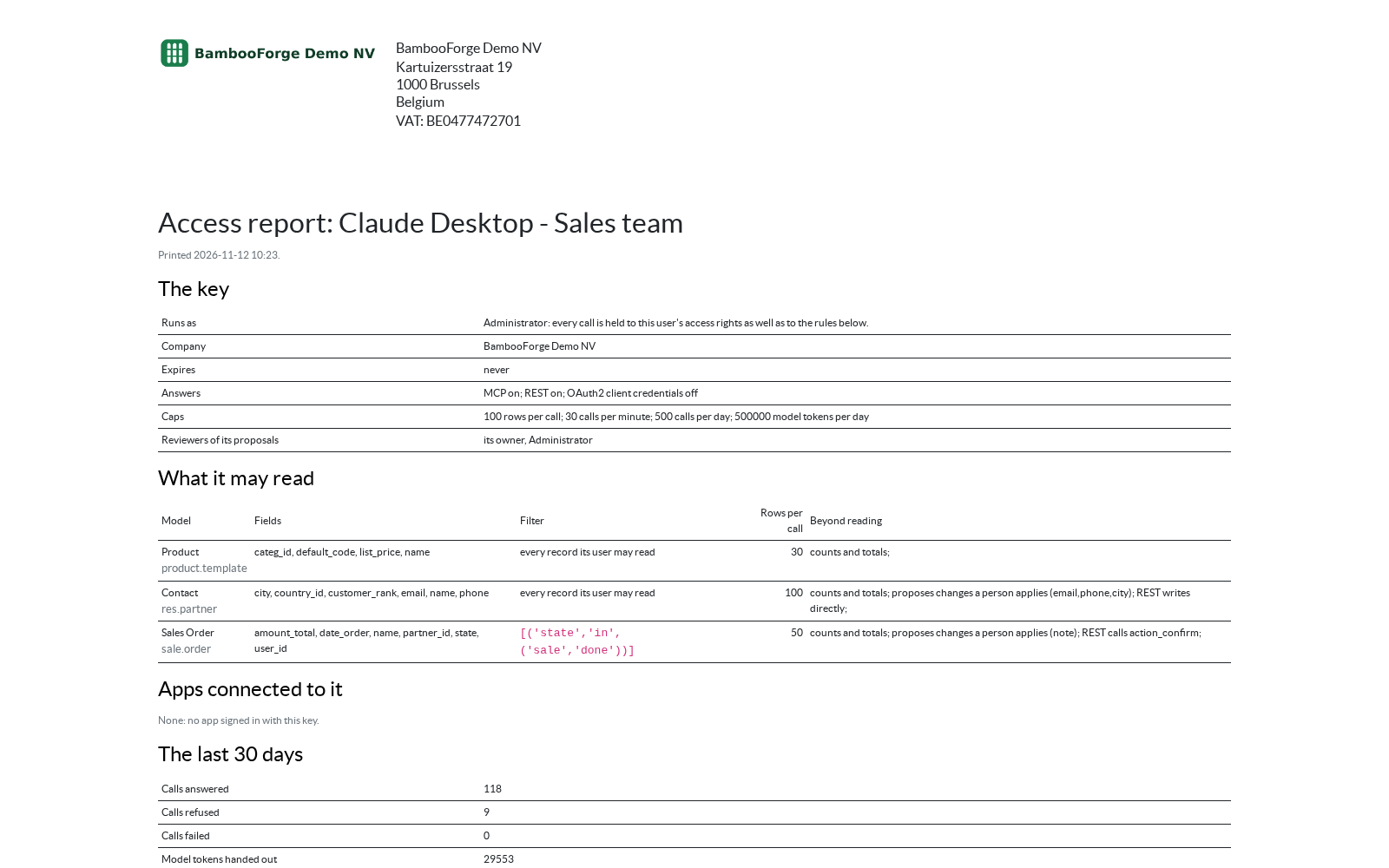
Access report
select keys under Keys and print: per key, the doors it answers, its caps, every model with its fields, filter and row cap, what it may propose or change, the apps connected to it and by whom, and its calls of the last 30 days.
The person who signs off before an AI app is let in, and the auditor after, read what the key reaches on one page.
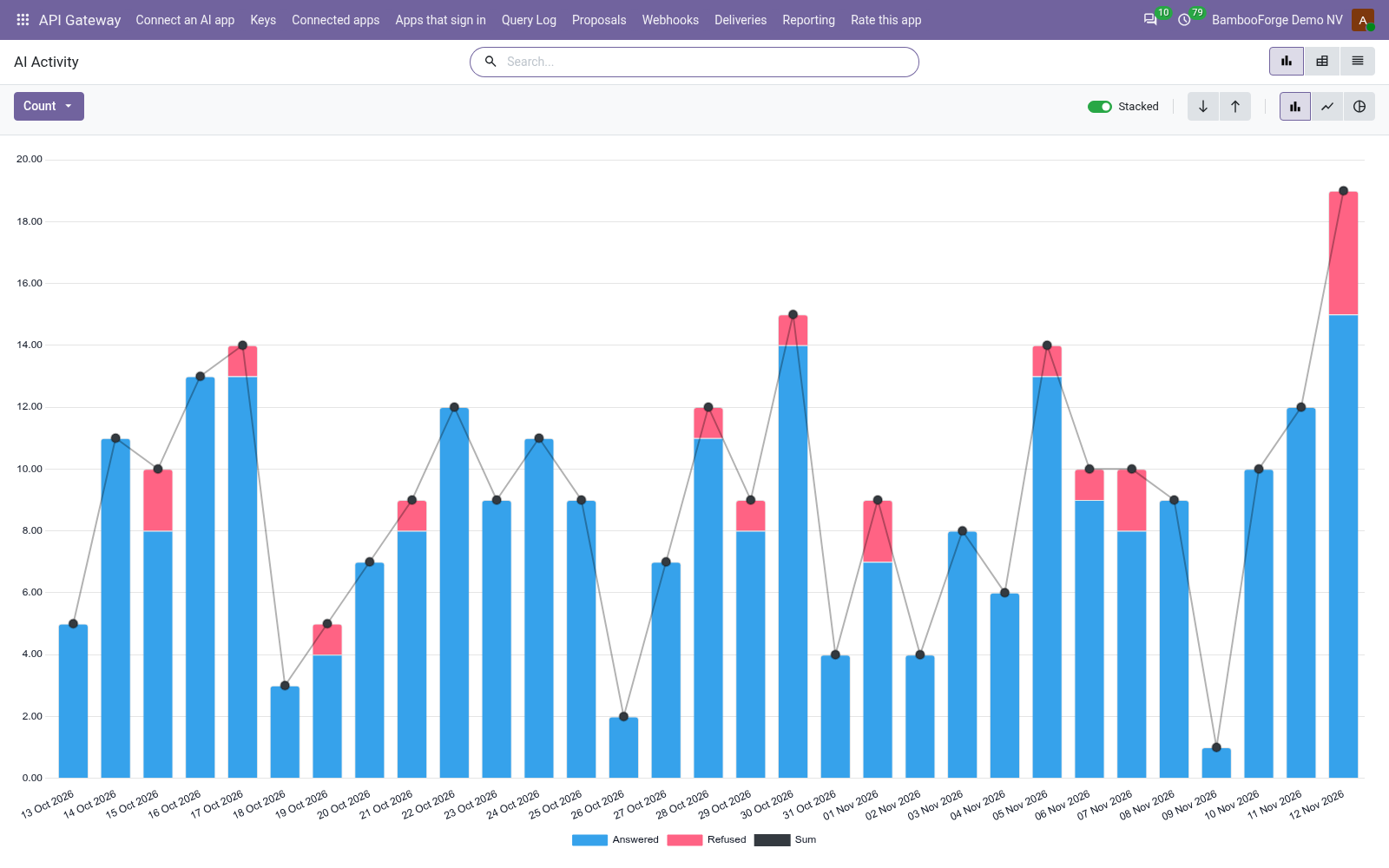
AI Activity
questions by whose key asked, tool, model, channel and day, with the refused and failed ones, the rows and estimated tokens handed out and the average answer time.
The IT manager sees which key costs the most, and a burst of refusals before it becomes an incident.
Proposals
the writes agents proposed, by model and outcome, the ones still waiting for a person included.
The data protection officer sees what agents try to change.
Time to Decide
the hours a person took to decide, averaged over the decided proposals, by reviewer and outcome; one still waiting is left out rather than counted as decided at once.
Shows whether reviewers keep up.
How you use it
From an address to paste to a call on record
Connect Claude, ChatGPT, Claude Code or Cursor
One page, the first of the menu.
- API Gateway > Connect an AI app: copy the MCP address and press Check my address. Each line says what to fix: https, the public name, the two discovery documents, the sign-in prompt.
- Pick a template (sales, CRM, inventory, invoices or contacts) and press Make the key: it reads only, answers MCP only, and runs as you.
- In the app, add the address as a connector. Odoo's login page opens; the person signs in, picks the key and presses Allow.
Decide what a key reaches
A model, its fields, a filter and a row cap.
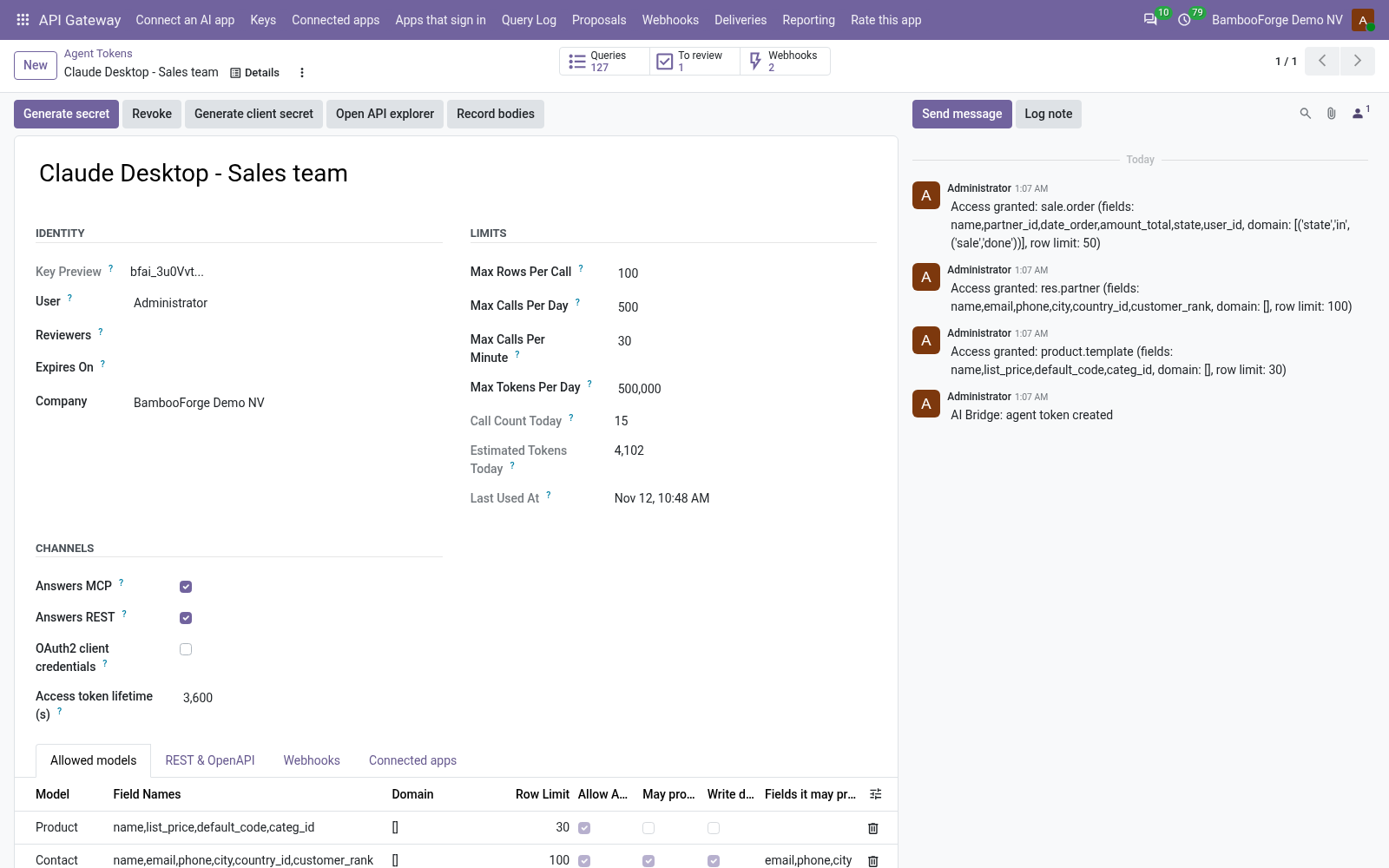
- API Gateway > Keys: list the models the key may read. Leave the fields empty for the model's stored fields without passwords, tokens and files, or name them.
- Add a filter the agent cannot widen, such as confirmed orders only, and a row cap that can lower the key's cap but never raise it.
- Set the caps per call, per minute and per day, and an expiry date. Revoke stops the key, its tokens and its connected apps at once.
Let the agent ask for a change
Nothing is written until a person says so.
- Tick May propose changes on a model, and name the fields an agent may propose if fewer than it reads.
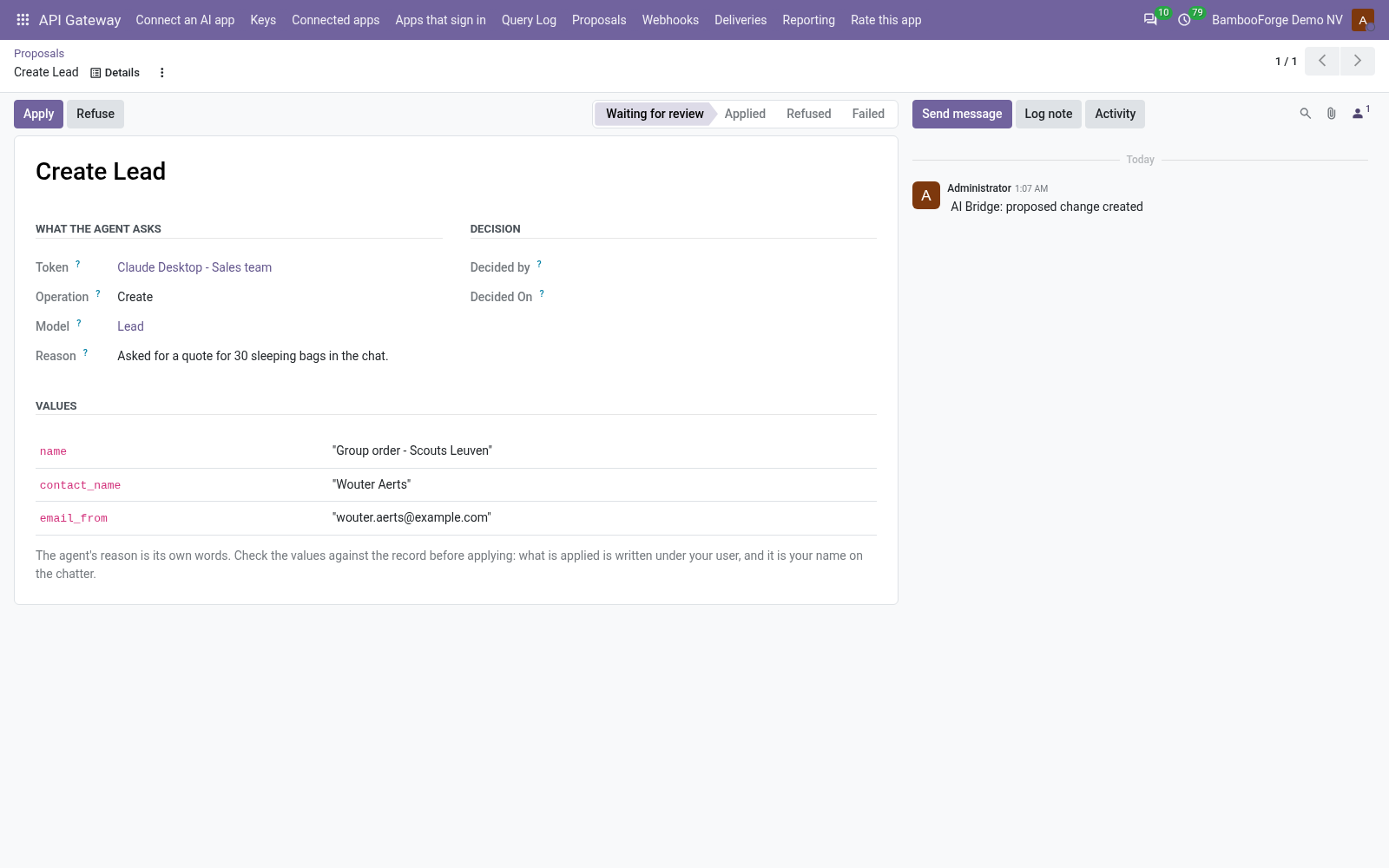
- The agent proposes a creation or an update with its reason; the key's reviewers get a to-do.
- Apply writes the values under the reviewer's own rights, and the record's chatter says which proposal and which key. Refuse takes a note the agent reads back.
Give a system REST and webhooks
The same key, two more doors.
- A system calls /api/v1 with the key in one header; the OpenAPI document at /api/openapi.json feeds Postman and code generators.
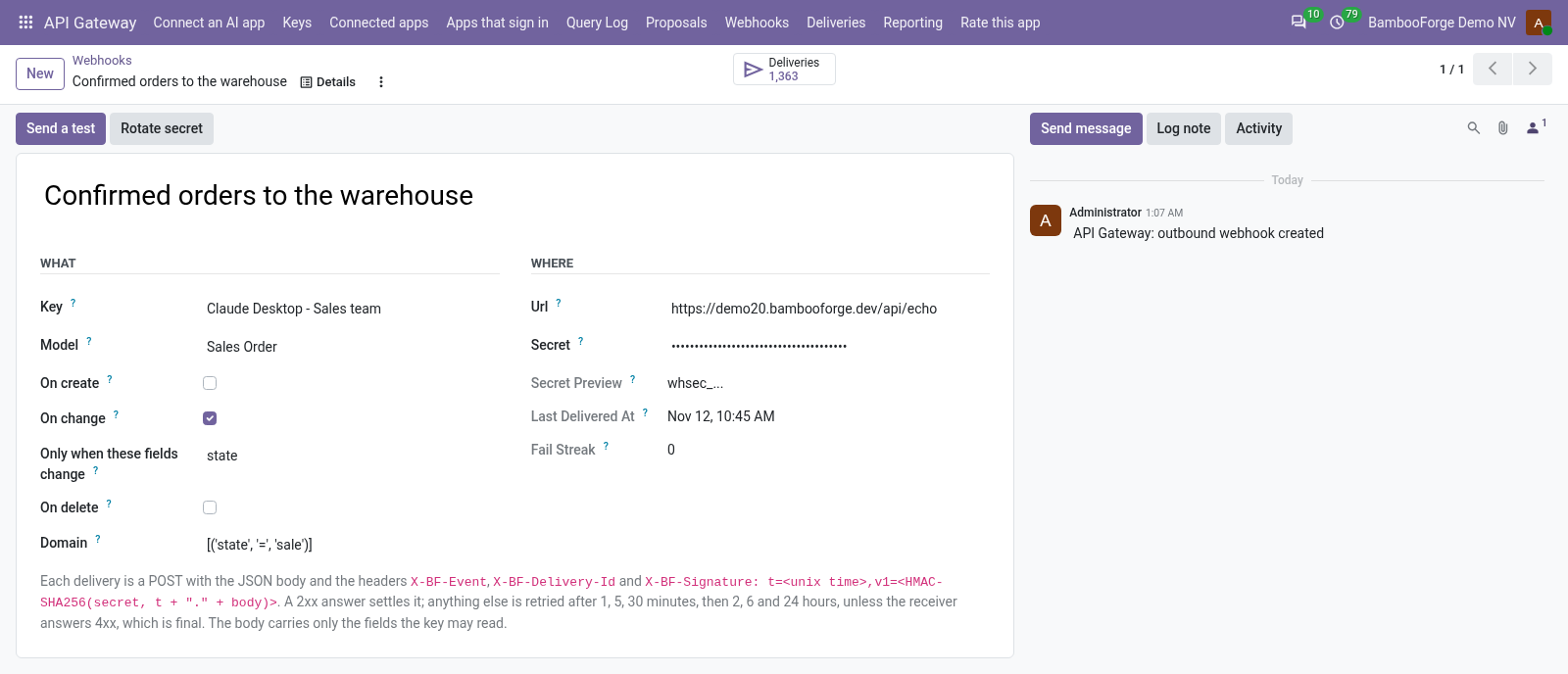
- A webhook POSTs a signed body when a record is created, changed or deleted, and retries for up to 33 hours.
- Every delivery is kept with the receiver's answer; Replay sends a dead one again.
What the IT manager reads
One board, one log, one printout.
- API Gateway > Reporting > KPIs: calls answered, refused and failed, model tokens handed out, proposals made and decided, apps connected, today, this month and the month before.
- Right now: proposals waiting, keys answering MCP, apps connected, keys expiring within 30 days, paused webhooks. Every figure opens its records.
- Select keys under Keys and print the Access report: what each key reaches, who connected an app to it, and its last 30 days.
Price and where to buy
149 EUR, one payment per Odoo series, on the Odoo Apps Store. Pick your series:
Twelve months of support by the people who wrote the code; bug fixes and improvements within the series free for as long as it is published. Report a bug within two months of purchase and, if it is not resolved within fifteen days, you get a full refund. Full source under OPL-1, no licence key, no phone-home. The whole promise.