 BambooForge Labs

- The right personStaff hold skills. A service offers only the members who hold what it requires, and the visitor can ask for one more, such as a language.
- A share by weightUnder Weighted share, a booking for anyone available goes to the free member with the fewest bookings per point of weight, over the window you set.
- Caps and backupsA daily and a weekly cap, counted in appointments, take a member off the booking page once reached. A backup member gets a booking only when no one else is free.
Runs onOdoo 16 to 20Community or Enterprise, self-hosted or Odoo.sh
NeedsOdoo only; includes booking prono Enterprise module
Price228 EURone-time, per series, on the Odoo Apps Store
Demodemo20.bambooforge.devlogin page already filled in
Supportsupport@bambooforge.devfirst reply within one business day
Version20.0.1.0.2
bambooforge_booking_routing37 automated checks run before every release of this app, the same suite on every series it ships for. The complete list is in the source you receive; run it yourself with --test-enable.
How you use it
Five settings, and what each does on the booking page
Flow 01
Skills
- Booking Pro > Skills: one line per skill, with a description and the staff who hold it.
- On a service, Required skills: only members who hold every one of them are offered.
- Visitor may ask for: the booking page shows these under Any preference?.
- The visitor picks one: the slots are those of the members who hold it, and the booking keeps the choice.
Flow 02
Weighted share
- Booking Pro > Staff: give each member a Weight, 1 or more.
- On the service, set Assign staff by to Weighted share and choose the share window in days.
- A booking for Anyone available goes to the free member with the fewest bookings per point of weight.
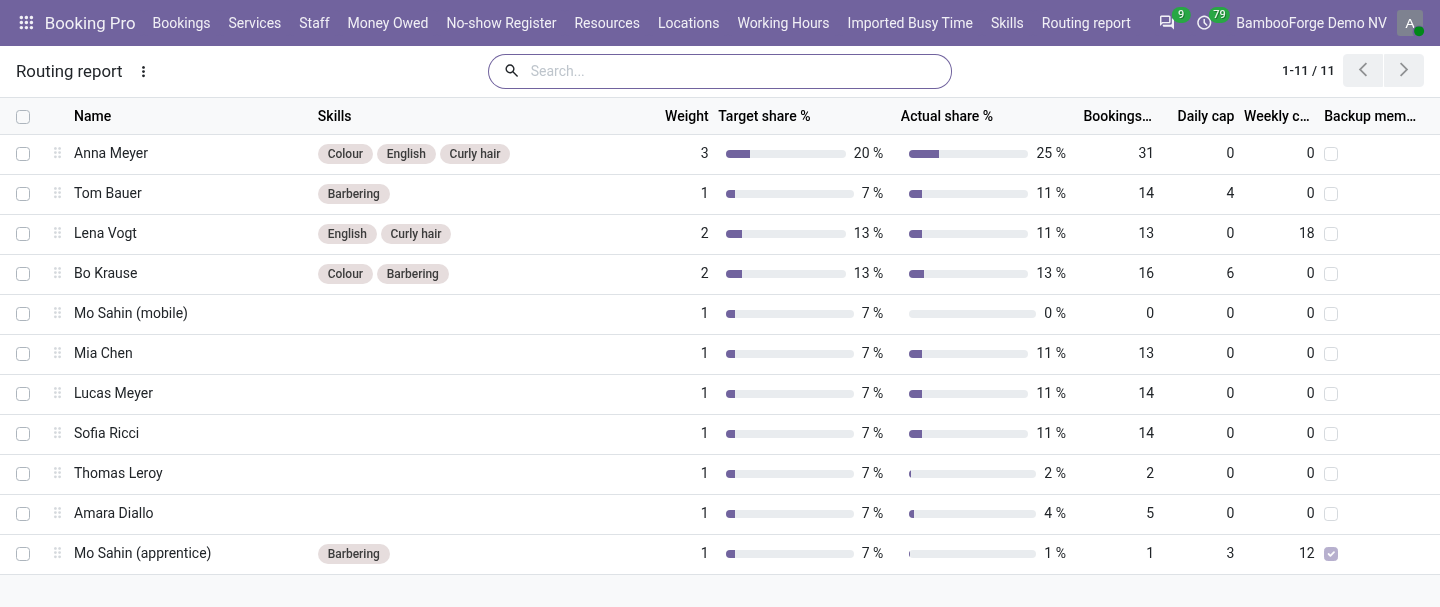
- Booking Pro > Routing report shows target share, actual share and bookings in the window.
Flow 03
Caps
- Booking Pro > Staff: Daily cap and Weekly cap, 0 for none.
- A cap counts appointments: a class of eight seats is one.
- At the cap, the rest of the day, or the whole week from Monday to Sunday, is no longer offered for that member.
- A class already on a full day can still be joined.
Flow 04
Backup members
- Tick Backup member in Booking Pro > Staff.
- For Anyone available, a backup member is passed over while another member is free.
- A visitor who chooses them by name still gets them.
Flow 05
Back office
- A booking keeps what the visitor asked for in Asked for.
- Choosing a member who lacks a required or requested skill shows the warning Skill gap.
- A booking made at the desk saves all the same, and caps are not checked there.
Price and where to buy
228 EUR, one payment per Odoo series, on the Odoo Apps Store. Pick your series:
Twelve months of support by the people who wrote the code; bug fixes and improvements within the series free for as long as it is published. Report a bug within two months of purchase and, if it is not resolved within fifteen days, you get a full refund. Full source under OPL-1, no licence key, no phone-home. The whole promise.