 BambooForge Labs

- One PHP file on the shop, two writesbf_api.php, which the module ships, reads the shop's own database. It writes two things only, each on a POST: a product's quantity, and an imported order's status with a line in its history when a status row asks for it.
- Orders that add upEach line lands on the product it sold, the shipping comes in as a line of its own and a coupon or a fee as one named line, so the order matches OpenCart's total before tax. The VAT shows on the order's OpenCart tab, on no line.
- One Odoo stock behind the storeOdoo sets each product's quantity in OpenCart to what it can still sell: a stock move queues the push a minute later, and the figure is never below zero and less a buffer you choose.
bambooforge_opencart_connector223 automated checks run before every release of this app, the same suite on every series it ships for. The complete list is in the source you receive; run it yourself with --test-enable.
How you use it
Four flows, in the order you will meet them
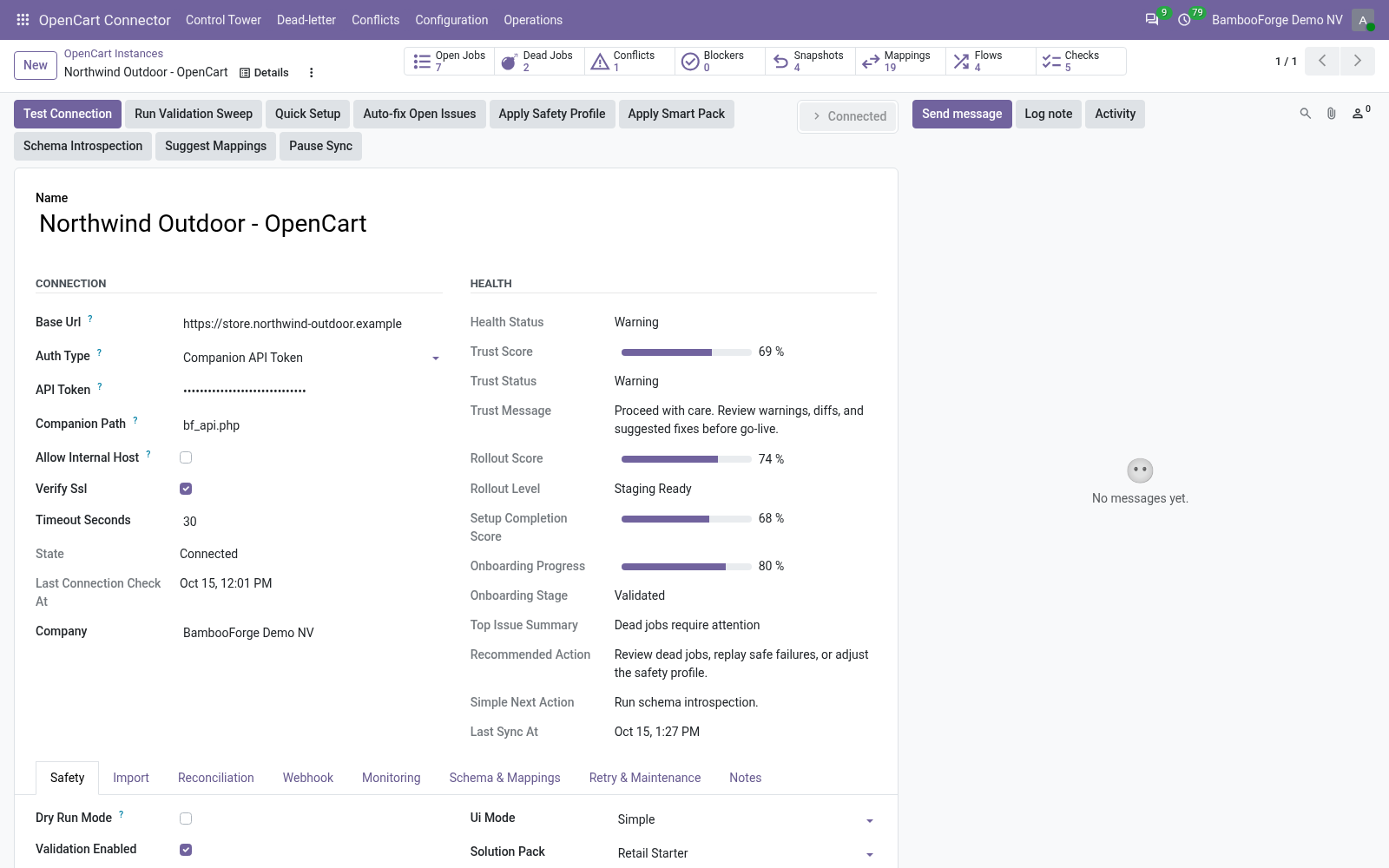
Connect: one PHP file, one instance per store
bf_api.php goes next to the shop's config.php; Test Connection proves the address and the token, and the first import writes nothing.
- Copy bf_api.php from the module to the shop's root folder and give it a long token of your own.
- In Odoo: OpenCart Connector > Configuration > Instances > New. Enter the shop's address and the same token.
- Press Test Connection. The state turns Connected and Order State Mappings gets fourteen rows.
- Queue the customer and product imports, read Operations > Logs and Validation Results, untick Dry Run Mode and import again.
Orders come in, matched to the shop's total
Each OpenCart status has a row, and each order its lines, its shipping and its adjustment.
- Press Queue Order Import, or tick Auto Import Orders for a listing every minute, newest orders first.
- Each line lands on the product bound to the OpenCart product it sold, else on the product with its SKU or model.
- The shipping becomes a line and a coupon or a fee one adjustment line; the OpenCart tab shows the total the order had to reach.
- The status row keeps the order a quotation, confirms it or cancels it, and can set a status of your own in OpenCart.
One Odoo stock behind the store
Odoo is the stock; OpenCart is told what it can still sell.
- Tick Stock Export Enabled and choose the Stock Source Warehouse.
- A sale confirmed, a delivery or a receipt done, or an inventory count queues a push a minute later; a scheduled run checks every 30 minutes.
- Each push sets the product's quantity in OpenCart and nothing else: the on-hand less what waits to go out, less the buffer, never below zero.
A failed job lands in a list, not in silence
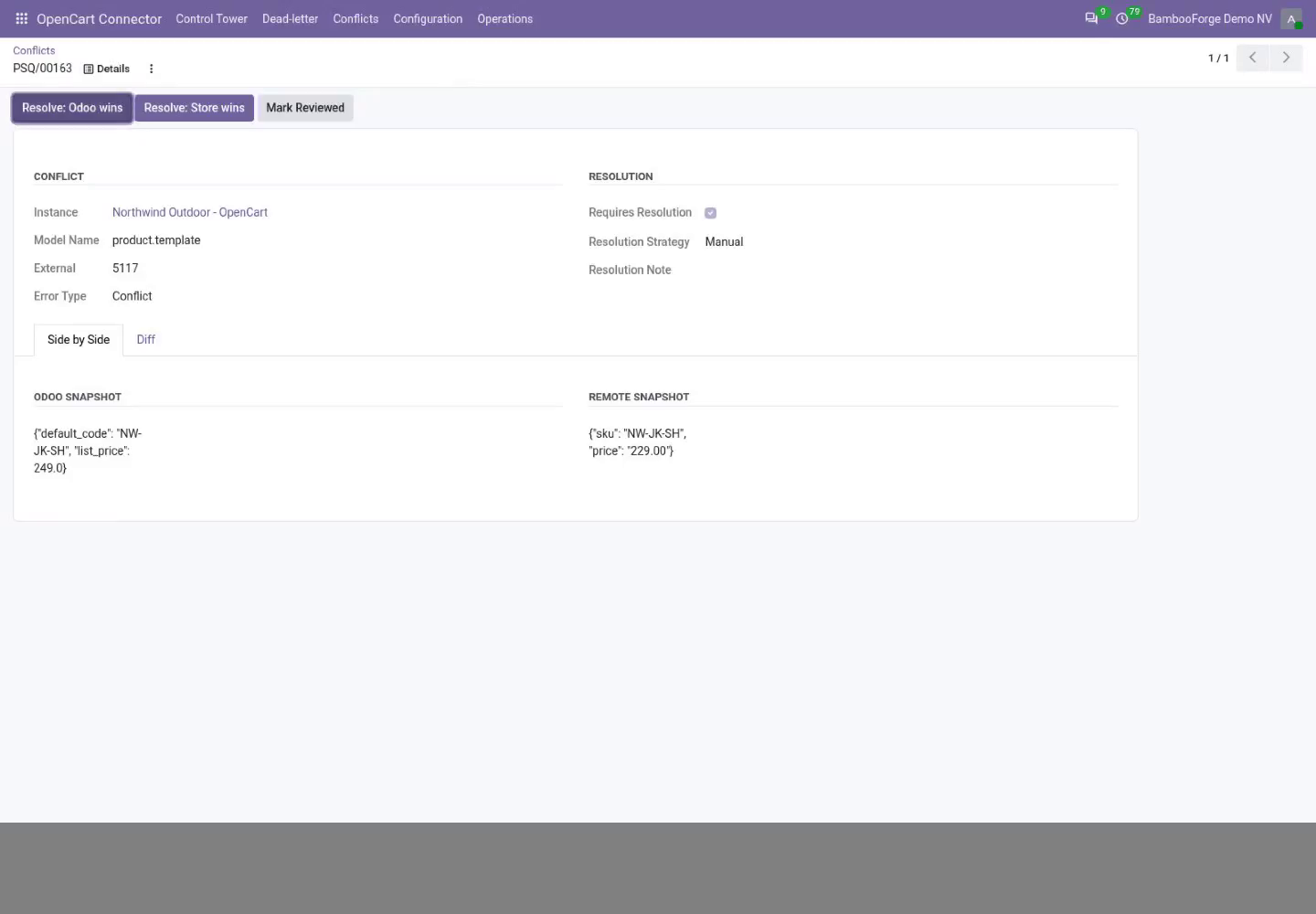
Every job is retried, set aside after its last try, and shown with its error.
- Open the Control Tower: one card per store with its backlog, dead letters and conflicts.
- Open Dead-letter, fix the cause the error names, and requeue the jobs.
- Resolve a conflict with the shop's version or Odoo's: OpenCart takes no export, so Odoo's version is kept and nothing is sent.
Price and where to buy
199 EUR, one payment per Odoo series, on the Odoo Apps Store. Pick your series:
Twelve months of support by the people who wrote the code; bug fixes and improvements within the series free for as long as it is published. Report a bug within two months of purchase and, if it is not resolved within fifteen days, you get a full refund. Full source under OPL-1, no licence key, no phone-home. The whole promise.