 BambooForge Labs

- Dry-run first, on every new shopA new instance simulates every job: no record changes in Odoo, nothing is sent to PrestaShop, and each job keeps what it would have written. You untick Dry Run Mode when you have read the results.
- Several shops, one Odoo stockOdoo sends each shop what it can still sell: the on-hand less what waits to go out, less a buffer, never below zero, per combination where the product has combinations. A sale confirmed in Odoo, from any shop, lowers what every shop is sent within about a minute.
- Orders that add up to PrestaShop's totalShipping comes in as a line of its own and what still differs (discounts, fees, rounding) as one named line. Imported lines carry no Odoo tax unless you turn tax matching on, so the order matches PrestaShop's total before tax, and the difference left shows on the order.
bambooforge_prestashop_connector284 automated checks run before every release of this app, the same suite on every series it ships for. The complete list is in the source you receive; run it yourself with --test-enable.
How you use it
Six flows, in the order you will meet them
Connect: one webservice key in PrestaShop, one instance in Odoo
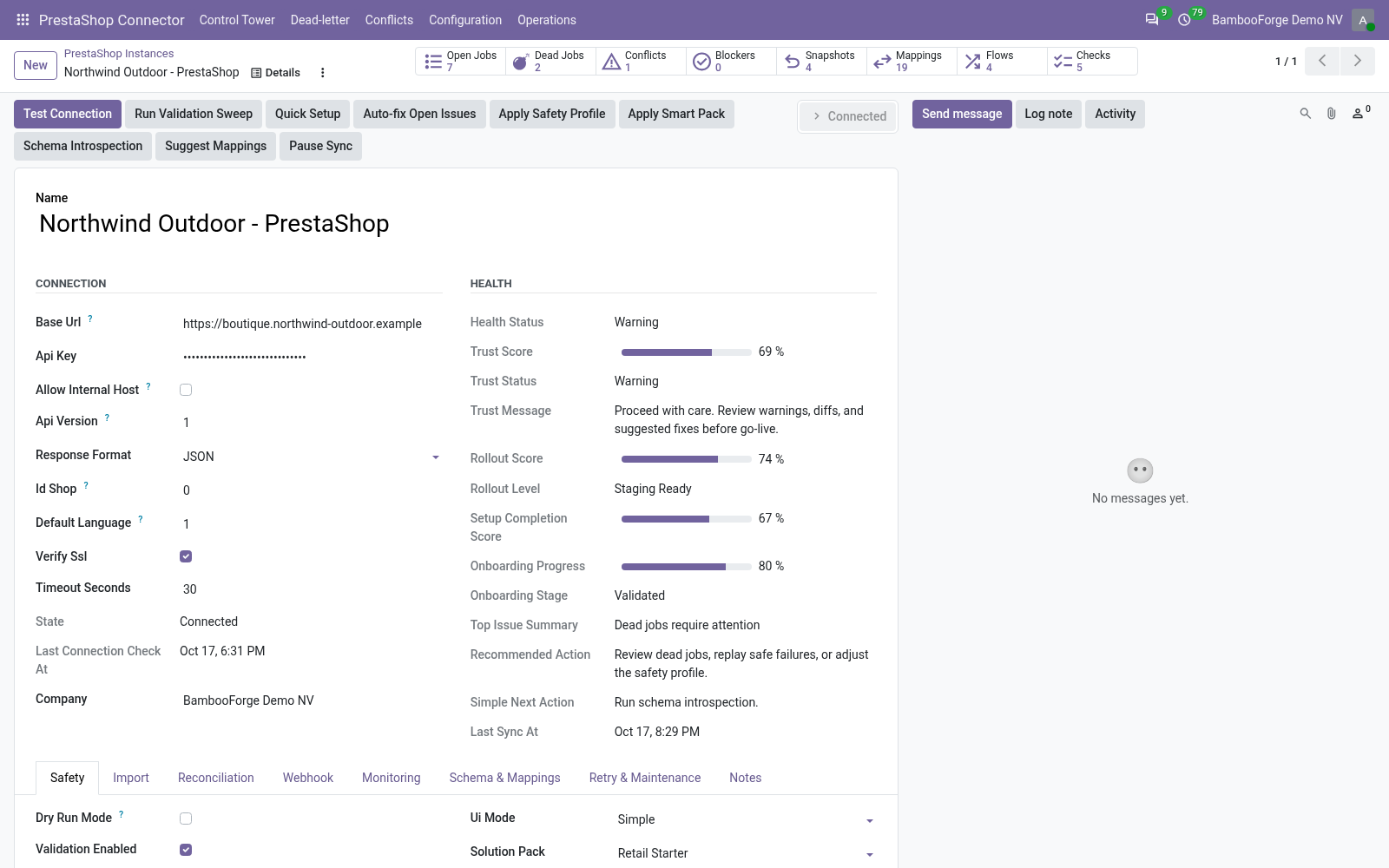
One instance per shop. Test Connection proves the address and the key, and the first sync writes nothing.
- In PrestaShop: Advanced Parameters > Webservice. Enable the webservice and add a key with View on what the connector reads, and Add and Modify on products, customers, images and stock_availables if Odoo is to write.
- In Odoo: PrestaShop Connector > Configuration > Instances > New. Enter the shop's address and paste the key; only a Settings administrator can read it back.
- Press Test Connection. The state turns Connected, Configuration > Order State Mappings gets twelve rows for the shop and the Onboarding Checklist its five checks; a failure sets Error, and Last Connection Error says why.
- On the Import tab press Queue Customer Import and Queue Product Import. Dry Run Mode is on: each job keeps what it would have written, and Operations > Validation Results lists what the checks found.
- Untick Dry Run Mode on the Safety tab and press the buttons again: the records are written, each with a PrestaShop tab and a row under Configuration > Binders.
Every order state has a rule, and every order adds up
PrestaShop gives each order the id of its state; a table per shop decides what Odoo does with it.
- Configuration > Order State Mappings holds twelve state ids, each with Keep draft, Confirm sale order, Cancel sale order or Ignore (do nothing). Compare the ids with the states of your own shop; an id without a row is ignored.
- Each line lands on the variant of the combination sold, else on the product whose Internal Reference is the line's reference, else on [PrestaShop] Unmapped product.
- Match Storefront Totals, on by default, adds shipping as a line and what still differs as one adjustment line. The order's PrestaShop tab shows the total it had to reach and the difference left.
Credit slips become draft credit notes
Switch Sync Refunds Enabled on and each import of an order also brings its credit slips.
- Each slip becomes a draft customer credit note: one line per refunded item, on the product of the order line it came from, at the refunded quantity and amount before tax, and refunded shipping as a line of its own.
- A slip whose customer is not in Odoo yet waits and is tried again every 15 minutes; it is never booked on your own company.
- A credit note, once imported, is left as it is. Auto Post Refund posts it on arrival; leave it off for the accountant to read it first.
Products and customers go out from a button
Odoo reads the shop's own record, changes what it has a value for, and sends it back.
- Queue PrestaShop Export on a product's PrestaShop tab sends the name, reference, price, active state and description, in the language of Default Language ID. The other languages, the categories and the features keep the shop's value.
- A product the shop does not hold yet is created in its Home category, visible, with its name in every language of the shop.
- Export prices from takes a price list instead of the Sales Price, and Only export records matching keeps the rest of the catalogue out.
One Odoo stock behind every shop
Odoo holds the stock; each shop is sent what Odoo can still sell.
- Tick Stock Export Enabled on the Import tab and pick the Stock Source Warehouse. Every 30 minutes, and about a minute after any stock move, each tracked product is sent its on-hand less what waits to go out, less Stock Buffer Qty, never below zero.
- A product with combinations is pushed per combination, each from the Odoo variant with the same attribute values.
- Stock Import To Odoo takes the shop's figure as a product's starting stock; after the first push it never sets Odoo's stock to the shop's figure again.
A failed job lands in a list, not in silence
Every call to the shop is a queue job, retried by the kind of error it met.
- Network, timeout and server errors are retried with a wait that doubles, 5 attempts at first; a refused key, or data the shop refuses, is not retried.
- Five failures in a row that are not about one record pause the instance; PrestaShop Auto Recover reopens it 30 minutes later unless blocking findings are open.
- A job out of retries is Dead: PrestaShop Connector > Dead-letter lists it by error type, with Requeue Jobs and Discard Jobs in the Actions menu. PrestaShop Connector > Conflicts shows Odoo's version of a record next to the shop's.
Price and where to buy
249 EUR, one payment per Odoo series, on the Odoo Apps Store. Pick your series:
Twelve months of support by the people who wrote the code; bug fixes and improvements within the series free for as long as it is published. Report a bug within two months of purchase and, if it is not resolved within fifteen days, you get a full refund. Full source under OPL-1, no licence key, no phone-home. The whole promise.