 BambooForge Labs

- Pay once per sentenceAn exact match is proposed with Match % 100 and is not sent. The batch counts the characters the provider never got.
- Near matches with their scoreA close source gets the remembered translation with its percentage in the note, so the reviewer fixes a word instead of reading a new sentence.
- The newest decision winsA later applied translation of the same source replaces the entry. The glossary still answers first.
Runs onOdoo 16 to 20Community or Enterprise, self-hosted or Odoo.sh
NeedsOdoo only; includes translate aino Enterprise module
Price178 EURone-time, per series, on the Odoo Apps Store
Demodemo20.bambooforge.devlogin page already filled in
Supportsupport@bambooforge.devfirst reply within one business day
Version20.0.1.0.2
bambooforge_translation_memory24 automated checks run before every release of this app, the same suite on every series it ships for. The complete list is in the source you receive; run it yourself with --test-enable.
How you use it
How it is used
Flow 01
Translate a batch with the memory
For a translator.
- AI Translate > Batches: Use translation memory is ticked, the threshold is 90 %.
- Scan Content, then Translate: the glossary answers first, then the memory, then the provider.
- Read Match %: 100 is an exact match, under 100 a near match to check.
- Apply Approved: each applied line becomes an entry.
Flow 02
Look after the memory
For the translation manager.
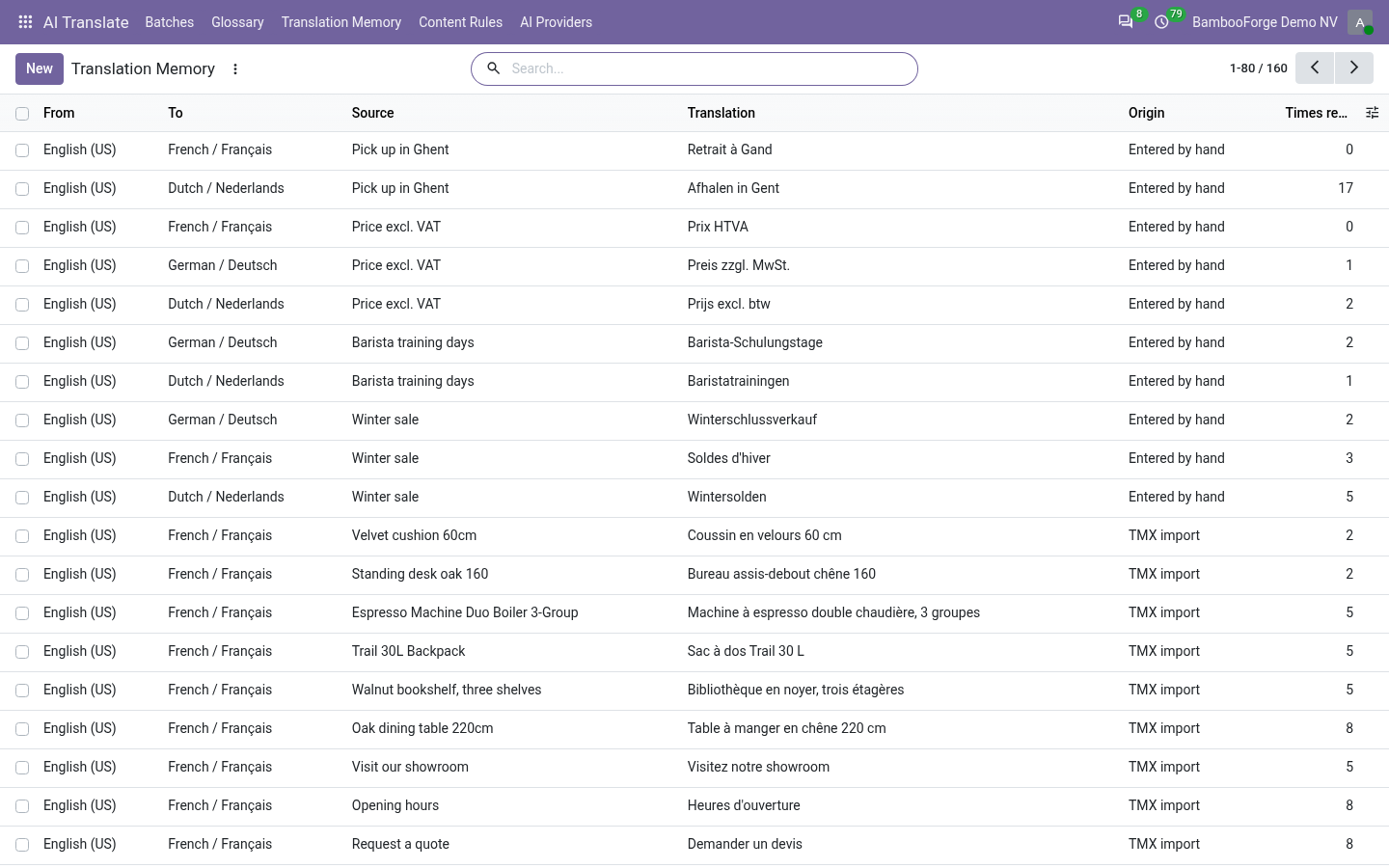
- AI Translate > Translation Memory: every entry, newest first.
- Filter by origin or by reuse, group by target language.
- Correct an entry in the list, or archive it so no batch proposes it.
Flow 03
Import and export TMX
For the translation manager.
- AI Translate > Import TMX: the file and the language pair.
- Each unit with both languages is remembered, origin TMX import.
- Translation Memory, select entries, Action > Export TMX.
Price and where to buy
178 EUR, one payment per Odoo series, on the Odoo Apps Store. Pick your series:
Twelve months of support by the people who wrote the code; bug fixes and improvements within the series free for as long as it is published. Report a bug within two months of purchase and, if it is not resolved within fifteen days, you get a full refund. Full source under OPL-1, no licence key, no phone-home. The whole promise.