 BambooForge Labs
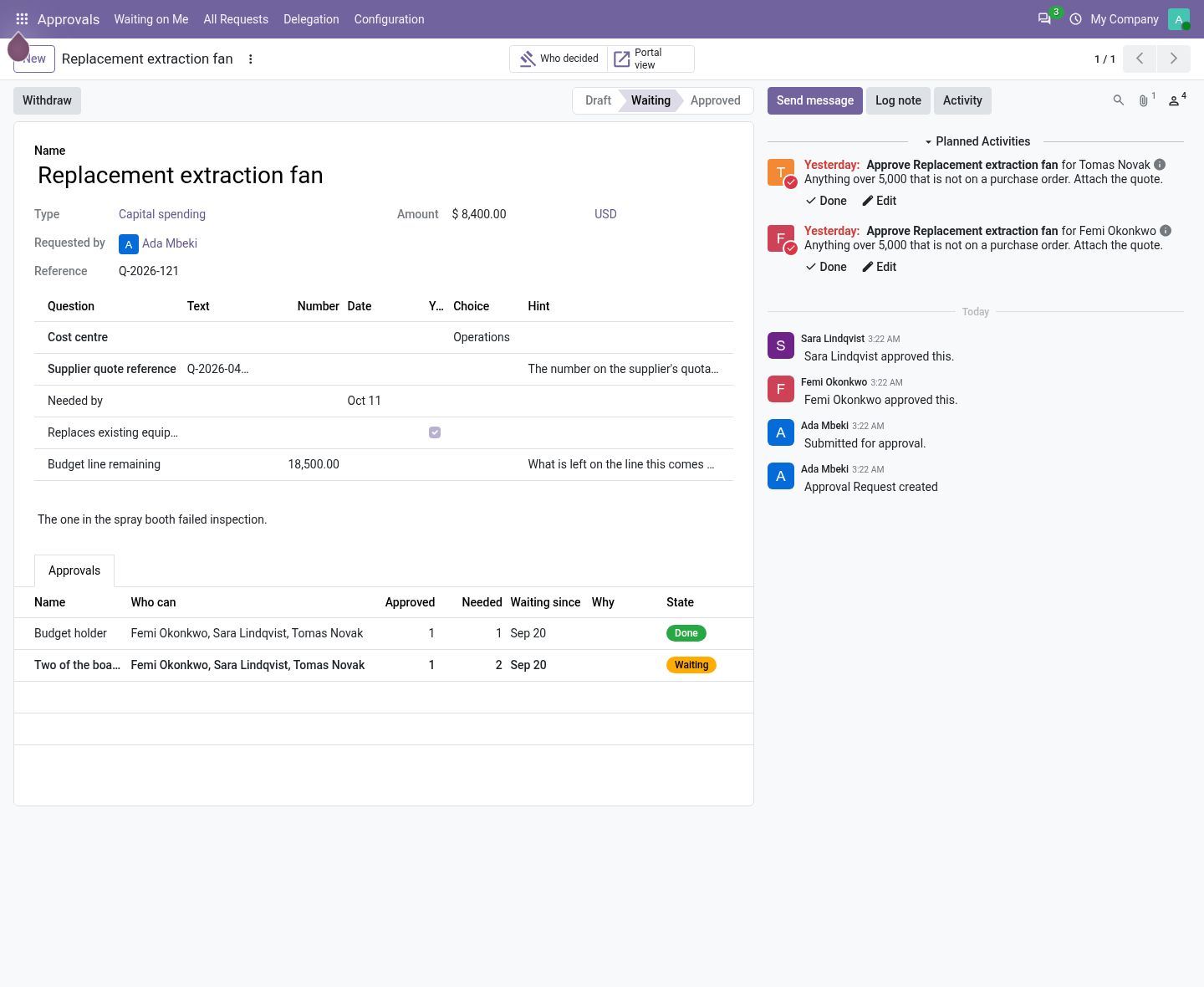
Approval Workflow for Odoo Community
Multi-step approval workflow with rules on any model: a condition picks the records, the ladder decides, and the decision sets a field, schedules an activity, sends a template, runs a server action or calls a signed webhook. SLA clocks, parallel steps, a decision trail nobody can edit.
Odoo Community has no approvals app. This one lets you define a kind of request, the ladder of people who approve it (in order, how many of them, from which amount) and what happens once it is decided. Requests are raised by hand, from the portal, or by a rule in front of a record's own button; each decision is written once, with who was asked and who clicked.
- "This request still needs a period, an amount,..." / "... an answer to:..."
- A field or a required question of the type is empty, or the attachment is missing.
- "' ' has nobody who could approve this."
- The group is empty, the only person in it is the requester, or its people belong to another company. Put somebody on the step.
- "' ' asks for approvals and only people could give one."
- The requester was taken off. Add somebody to the step or lower what it asks for.
Discount Approval on Sales Orders
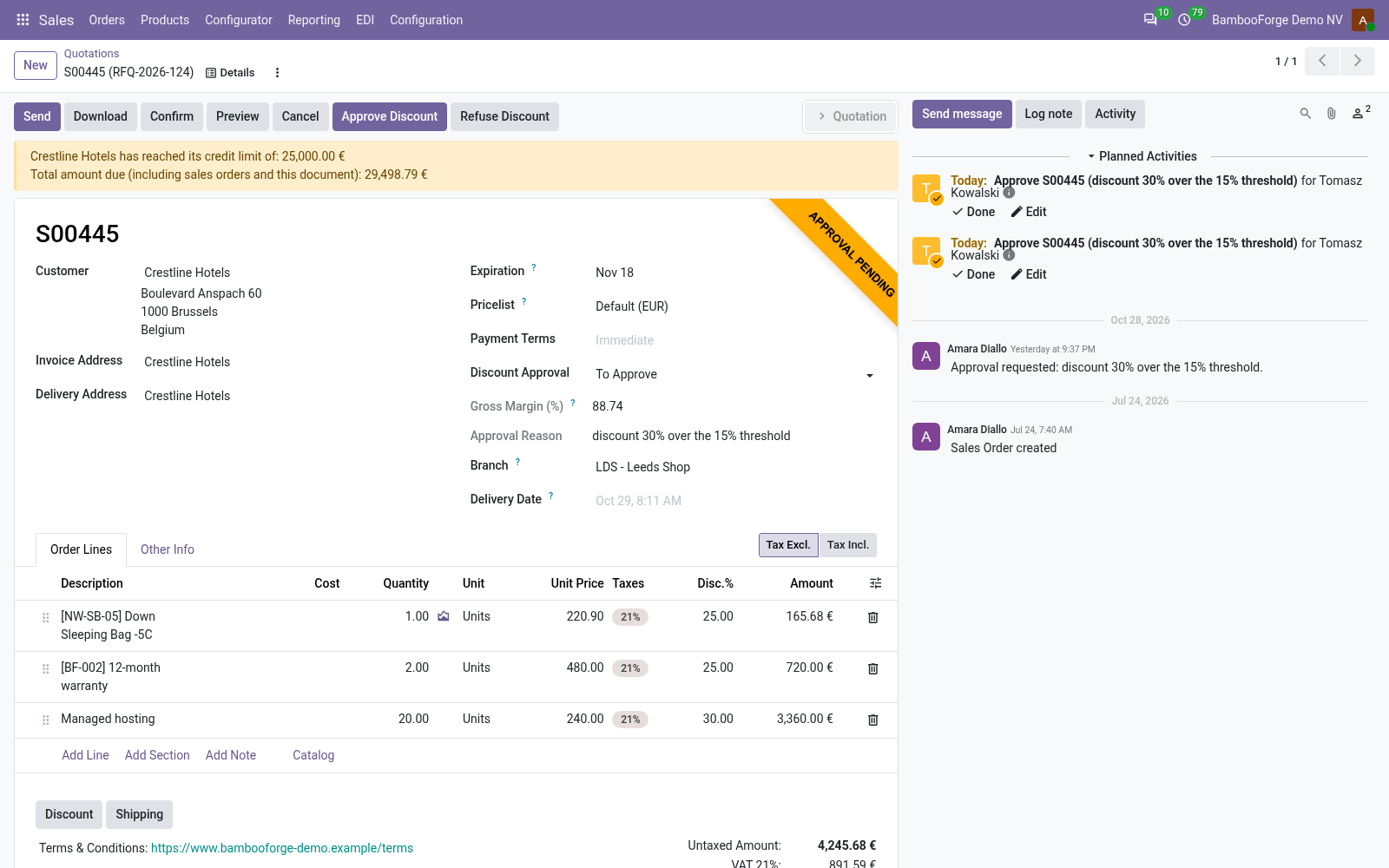
Require manager approval when an order's margin falls below a floor or a line is priced below cost: the order says why it waits, a sales manager approves or refuses, and the chatter keeps who and when.
A quotation whose deepest line discount is above your limit, whose gross margin is under your floor, or that sells a line below cost, waits for a sales manager's approval before it can be confirmed. The order says why it waits, the sales manager approves or refuses on the order, and the chatter keeps who decided and when.
- "Order needs sales-manager approval before it can be confirmed ( )."
- The order crosses a limit and is not approved. Bring the discount under the limit or the margin over the floor, or have a sales manager press Approve Discount.
- "Only a Sales Manager can approve or refuse a discount."
- The user is not Sales / Administrator, on the button, an import or a script.
- "Only a Sales Manager can approve or refuse discounts."
- Approve Discount or Refuse Discount pressed by somebody without the right.
Process Designer with Approvals: an Approval Request per Stage
A process stage can ask Approval Workflow for a yes: the case raises the request as it arrives, waits for it, and moves on by itself once approved - installed by itself alongside Process Designer and Approval Workflow.
With Process Workflow Pro and Approval Workflow installed on Odoo 20, a stage of a process can ask an approval type for a yes. The case raises the request as it enters the stage, cannot leave before it is approved, and moves on by itself once it is. This small module installs by itself when both apps are there.
- "Still waiting for: Approval (Waiting)"
- The request is not approved yet. Open it from the case's approval request(s) link.
- "The approval request is waiting to be completed and submitted:..."
- The ladder could not be built: the type names nobody but the starter, or a step applies to no amount. Correct the type, then submit the request from Approvals.
- "' ' asks for no approval."
- Raise the Approval Again on a stage with no approval type.
Other questions we answer
Odoo access control: who can see whatAudit trail for OdooPrint from Odoo without an IoT boxShopify and Odoo in syncWooCommerce and Odoo in syncPrestaShop and Odoo in syncConnect Odoo to n8n, Make and ZapierPeppol e-invoicing in OdooE-invoice checks before an invoice leaves OdooDocument management in OdooKPI dashboards for OdooFinancial statements on Odoo CommunityGDPR and cookie consent for OdooQuality management for ISO 9001 in OdooAI translation for an Odoo website and catalogueOdoo for a dental clinicOdoo for a hotelOdoo for a restaurantOdoo for a garage or used-car dealerOdoo for construction: BoQ and job costingSubscriptions and recurring invoicing on Odoo CommunityHelpdesk for Odoo CommunityField sales on a phone with Odoo